C-RUN Messages Rules window
What do you want to do?
Learn about:
Learn how to:
Get reference information about the C-RUN Messages Rules window, see below the line.

The C-RUN Messages Rules window is available from the View menu.
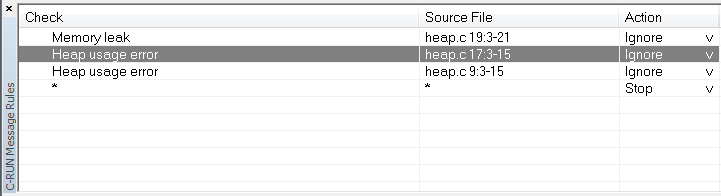
This window displays the rules that control how messages are reported in the C-RUN Messages window. When a potential error is detected, it is matched against these rules (from top to bottom) and the action taken is determined by the first rule that matches. At the bottom, there is always a catch-all rule that matches all messages. This rule can be modified using Default action in the C-RUN Messages window.
* is used as a wildcard.
Context menu
This context menu is available:
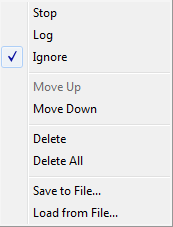
These commands are available:
- Stop/Log/Ignore
Selects the action to take when a message matches the selected rule.
- Move Up/Down
Moves the selected rule up/down one step.
- Delete
Deletes the selected rule.
- Delete All
Deletes all rules.
- Save to File
Opens a dialog box where you can choose to save rules, see Load from File. See also ‑‑rtc_rules.
- Load from File
Opens a dialog box where you can choose to load rules from a file.