Library Configuration
The Library Configuration options determine which library to use.
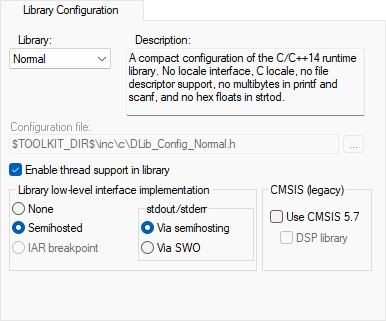
For information about the runtime library, library configurations, the runtime environment they provide, and the possible customizations, see The DLIB runtime environment.
Library
Selects which runtime library to use. For information about available libraries, see Prebuilt runtime libraries.
The names of the library object file and library configuration file that actually will be used are displayed in the Library file and Configuration file text boxes, respectively.
Configuration file
Displays the library configuration file that will be used. A library configuration file is chosen automatically depending on the project settings. If you have chosen Custom DLIB in the Library drop-down list, you must specify your own library configuration file.
Enable thread support in library
Select this option to automatically configure the runtime library for use with threads.
Library low-level interface implementation
Controls the type of low-level interface for I/O to be included in the library.
For Cortex-M, choose between:
- None
No low-level support for I/O available in the libraries. You must provide your own
__writefunction to use the I/O functions part of the library.
- Semihosted, stdout/stderr via semihosting
Semihosted I/O which uses the
BKPTinstruction.
- Semihosted, stdout/stderr via SWO
Semihosted I/O which uses the
BKPTinstruction for all functions except for thestdoutandstderroutput where the SWO interface is used. This means a much faster mechanism where the application does not need to halt execution to transfer data.
- IAR breakpoint
Not available.
For other cores, choose between:
- None
No low-level support for I/O available in the libraries. You must provide your own
__writefunction to use the I/O functions part of the library.
- Semihosted
Semihosted I/O which uses the
SVCinstruction (earlierSWI).
- IAR breakpoint
The IAR proprietary variant of semihosting, which does not use the
SVCinstruction and, therefore, does not need to set a breakpoint on theSVCvector. This is an advantage for applications which require theSVCvector for their own use, for example an RTOS. This method can also lead to performance improvements. However, this method does not work with applications, libraries, and object files that are built using tools from other vendors.
CMSIS
To enable CMSIS support, use these options:
- Use CMSIS
Adds the CMSIS header files to the compiler include path.
Note that if your application source code includes CMSIS header files explicitly, then you should not use this option. This option is only available for Cortex-M devices.
- DSP library
Links your application with the CMSIS DSP library. This option is only available for Cortex-M devices.