Language 1
The Language 1 options determine which programming language to use and which extensions to enable.
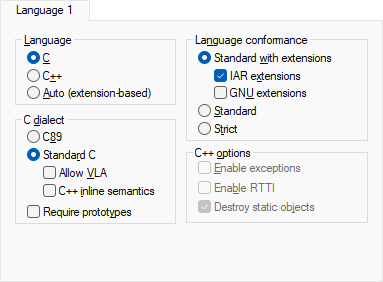
For more information about the supported languages, their dialects, and their extensions, see Using C and Using C++.
Language
Determines the compiler support for either C or C++. Choose between:
- C (default)
Makes the compiler treat the source code as C, which means that features specific to C++ cannot be used.
- C++
Makes the compiler treat the source code as C++.
- Auto
Language support is decided automatically depending on the filename extension of the file being compiled:
c: files with this filename extension are treated as C source files.cpp,.cc,.cp,.cxx, and.c++: files with these filename extensions will be treated as C++ source files.
Language conformance
Controls how strictly the compiler adheres to the standard C or C++ language. Choose between:
- Standard with extensions
Choose between these subsettings, or select both:
- IAR extensions
Accepts IAR-specific extensions to the standard C or C++ language.
- GNU extensions
Accepts GNU extensions to the standard C or C++ language.
If you select none of the subsettings, the option has no effect.
- Standard
Disables language extensions, but does not adhere strictly to the C or C++ dialect you have selected. Some very useful relaxations to C or C++ are still available.
- Strict
Adheres strictly to the C or C++ dialect you have selected. This setting disables a great number of useful extensions and relaxations to C or C++.
C dialect
Selects the dialect if C is the supported language. Choose between:
- C89
Enables the C89 standard instead of Standard C.
- Standard C
Enables the C18 standard, also known as Standard C. This is the default standard used in the compiler, and it is stricter than C89. Features specific to C89 cannot be used. In addition, choose between:
Allow VLA, allows the use of C11 variable length arrays.
C++ inline semantics, enables C++ inline semantics when compiling a Standard C source code file.
- Require prototypes
Forces the compiler to verify that all functions have proper prototypes, which means that source code containing any of the following will generate an error:
A function call of a function with no declaration, or with a Kernighan & Ritchie C declaration.
A function definition of a public function with no previous prototype declaration.
An indirect function call through a function pointer with a type that does not include a prototype.
C++ options
Selects C++ language options. Choose between:
- Enable exceptions
Enables exception support in the C++ language.
- Enable RTTI
Enables runtime type information (RTTI) support in the C++ language.
- Destroy static objects
Makes the compiler generate code to destroy C++ static variables that require destruction at program exit.
Plain 'char' is
Normally, the compiler interprets the plain char type as unsigned char. Plain 'char' is Signed makes the compiler interpret the char type as signed char instead, for example for compatibility with another compiler.
Note
The runtime library is compiled with unsigned plain characters. If you select the Signed option, references to library functionality that uses unsigned plain characters will not work.
Floating-point semantics
Controls floating-point semantics. Choose between:
- Strict conformance
Makes the compiler conform strictly to the C and floating-point standards for floating-point expressions.
- Relaxed
Makes the compiler relax the language rules and perform more aggressive optimization of floating-point expressions. This option improves performance for floating-point expressions that fulfill these conditions:
The expression consists of both single- and double-precision values
The double-precision values can be converted to single precision without loss of accuracy
The result of the expression is converted to single precision.
Note that performing the calculation in single precision instead of double precision might cause a loss of accuracy.