Preprocessor
The Preprocessor options allow you to define symbols and include paths for use by the compiler.
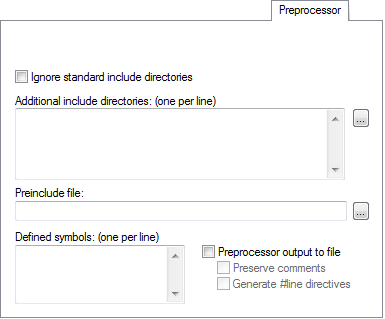
Ignore standard include directories
Normally, the compiler and assembler automatically look for include files in the standard include directories. Use this option to turn off this behavior.
Additional include directories
Specify the full paths of directories to search for include files, one per line. Any directories specified here are searched before the standard include directories, in the order specified.
Use the browse button to display the Edit Include Directories dialog box, where you can specify directories using a file browser. For more information, see Edit Include Directories dialog box.
To avoid being dependent on absolute paths, and to make the project more easily portable between different machines and file system locations, you can use argument variables like $TOOLKIT_DIR$ and $PROJ_DIR$, see Argument variables.
Preinclude file
Specify a file to include before the first line of the source file.
Defined symbols
Define a macro symbol (one per line), including its value, for example like this:
TESTVER=1
This has the same effect as if a line like this appeared before the start of the source file:
#define TESTVER 1
A line with no value has the same effect as if =1 was specified.
Preprocessor output to file
Makes the compiler and assembler output the result of the preprocessing to a file with the filename extension i, located in the lst directory. Choose between:
- Preserve comments
Includes comments in the output. Normally, comments are treated as whitespace, and their contents are not included in the preprocessor output.
- Generate #line directives
Generates
#linedirectives in the output to indicate where each line originated from.