Custom Tool Configuration
What do you want to do?
Learn how to: Adding an external tool
Get reference information about the Custom Tool Configuration options, see below the line.

The Custom Tool Configuration options control the invocation of the tools you want to add to the tool chain.
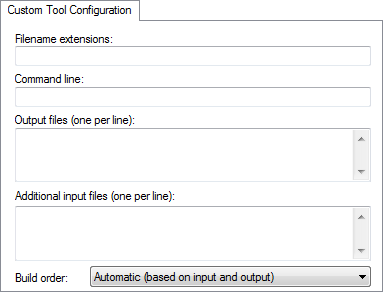
For an example, see Extending the toolchain.
Filename extensions
Specify the filename extensions for the types of files that are to be processed by the custom tool. You can type several filename extensions. Use commas, semicolons, or blank spaces as separators. For example:
.htm; .html
Command line
Specify the command line for executing the external tool.
Output files
Specify the name for the output files from the external tool.
Additional input files
Specify any additional files to be used by the external tool during the build process. If these additional input files, dependency files, are modified, the need for a rebuild is detected.
Build order
Specify where in the build process to execute the external tool. Choose between:
- Automatic (based onDeduce from the input and output)
The time of execution will be calculated automatically by the build engine.
- Run before compiling/assembling Make before the compiler/assembler
The tool will be executed before the compiler or assembler.
- Run before linking Make before the linker
The tool will be executed after the compiler or assembler, but before the linker.