Autostep settings dialog box
What do you want to do?
Learn about:
Learn how to:
Get reference information on the Autostep settings dialog box, see below the line.

The Autostep settings dialog box is available by choosing Debug>Autostep.
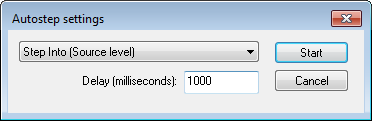
Use this dialog box to configure autostepping.
Select the step command you want to automate from the drop-down menu. The step will be performed with the specified interval. For a description of the available step commands, see Single stepping. You can stop the autostepping by clicking the Break button on the debug toolbar.
Note
User-defined millisecond timeouts and delays are generated using the host operating system clock ticks. Because the host operating system is not a real-time OS, the actual delay or timeout will vary each time with approximately 5–20 ms.