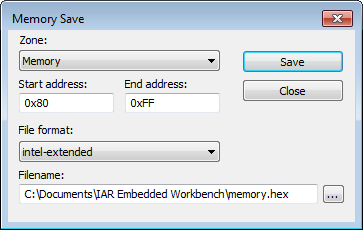
IAR Embedded Workbench for RH850 3.20.xC-SPY DebuggingMemory and registersReference information on memory and registersMemory Save dialog boxMemory Save dialog boxIn this section: What do you want to do?Learn about:Briefly about monitoring memory and registersC-SPY memory zonesGet related information:Memory Restore dialog boxGet reference information about the Memory Save dialog box, see below the line.The Memory Save dialog box is available by choosing Debug>Memory>Save or from the context menu in the Memory window.Use this dialog box to save the contents of a specified memory area to a file.RequirementsCan be used with all C-SPY debugger drivers and debug probes.ZoneSelects a memory zone, see C-SPY memory zones.Start addressSpecify the start address of the memory range to be saved.End addressSpecify the end address of the memory range to be saved.File formatSelects the file format to be used, which is Intel-extended by default.FilenameSpecify the destination file to be used. A browse button is available.SaveSaves the selected range of the memory zone to the specified file.