Quick Watch window
What do you want to do?
Learn about:
Learn how to:
Get reference information about the Quick Watch window, see below the line.

The Quick Watch window is available from the View menu and from the context menu in the editor window.
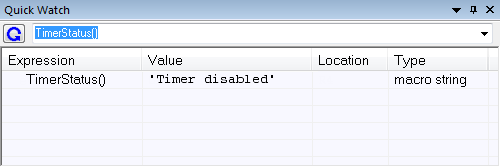
Use this window to watch the value of a variable or expression and evaluate expressions at a specific point in time.
In contrast to the Watch window, the Quick Watch window gives you precise control over when to evaluate the expression. For single variables this might not be necessary, but for expressions with possible side effects, such as assignments and C-SPY macro functions, it allows you to perform evaluations under controlled conditions.
In the editor window, right-click on the expression you want to examine and choose Quick Watch from the context menu that appears.
The expression will automatically appear in the Quick Watch window.
Alternatively:
In the Quick Watch window, type the expression you want to examine in the Expressions text box.
Click
 the Recalculate button to calculate the value of the expression.
For an example, see Using C-SPY macros.
Context menu
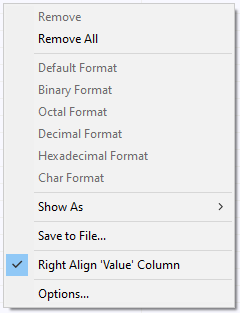
This context menu is available:
Note
The contents of this menu are dynamic and depend on which features that your combination of software and hardware supports. However, the list of menu commands below is complete and covers all possible commands.
These commands are available:
- Remove
Removes the selected expression from the window.
- Remove All
Removes all expressions listed in the window.
- Default Format, Binary Format, Octal Format, Decimal Format, Hexadecimal Format, Char Format
Changes the display format of expressions. The display format setting affects different types of expressions in different ways. Your selection of display format is saved between debug sessions. These commands are available if a selected line in the window contains a variable.
The display format setting affects different types of expressions in these ways:
Variables
The display setting affects only the selected variable, not other variables.
Array elements
The display setting affects the complete array, that is, the same display format is used for each array element.
Structure fields
All elements with the same definition—the same field name and C declaration type—are affected by the display setting.
- Show As
Displays a submenu that provides commands for changing the default type interpretation of variables. The commands on this submenu are mainly useful for assembler variables—data at assembler labels—because these are, by default, displayed as integers.For more information, see Viewing assembler variables.
- Save to File
Saves content to a file in a tab-separated format.
- Right Align ‘Value’ Column
Right-aligns the contents of the Value column.
- Options
Displays the IDE Options dialog box where you can set various options for C-SPY windows.