System startup and termination
This section describes the runtime environment actions performed during startup and termination of your application.
The code for handling startup and termination is located in the source files cstartup and low_level_init.c located in the rh850\src\lib\rh850 directory. The name of the cstartup file depends on the device you are developing for:
Type of RH850 device | Cstartup filename |
|---|---|
G3 Single-core |
|
G3 Multi-core |
|
G3 with a PCU core |
|
G4 Single-core |
|
G4 Multi-core |
|
n corresponds to the number of cores that your application uses.
For information about how to customize the system startup code, see System initialization.
System startup
During system startup, an initialization sequence is executed before the main function is entered. This sequence performs initializations required for the target hardware and the C/C++ environment.
For the hardware initialization, it looks like this:
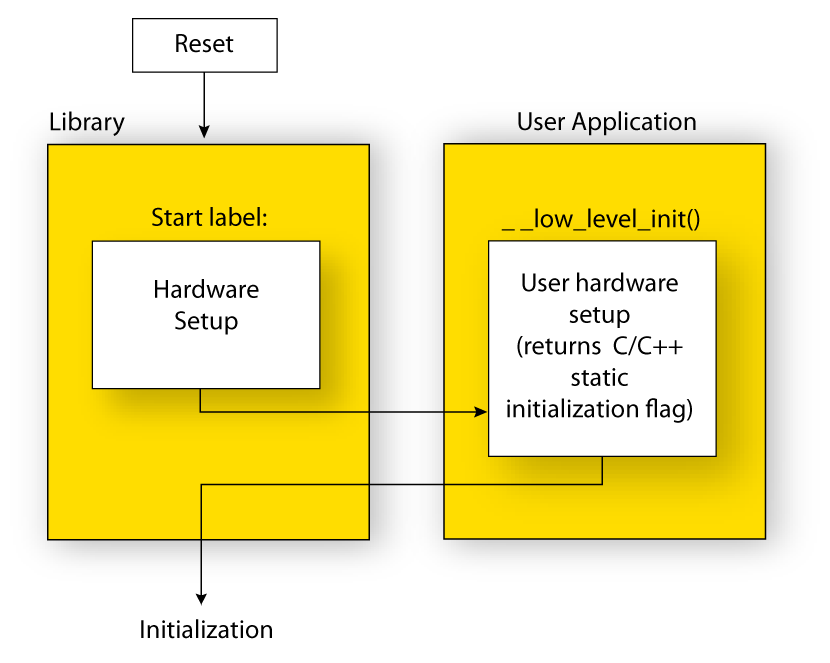
When the CPU is reset it will start executing at the program entry label in the system startup code (see Building applications—an overview, for a description of the program start label).
The stack pointer is initialized to the end of the
CSTACKblockThe function
__low_level_initis called if you defined it, giving the application a chance to perform early initializations.
For the C/C++ initialization, it looks like this:
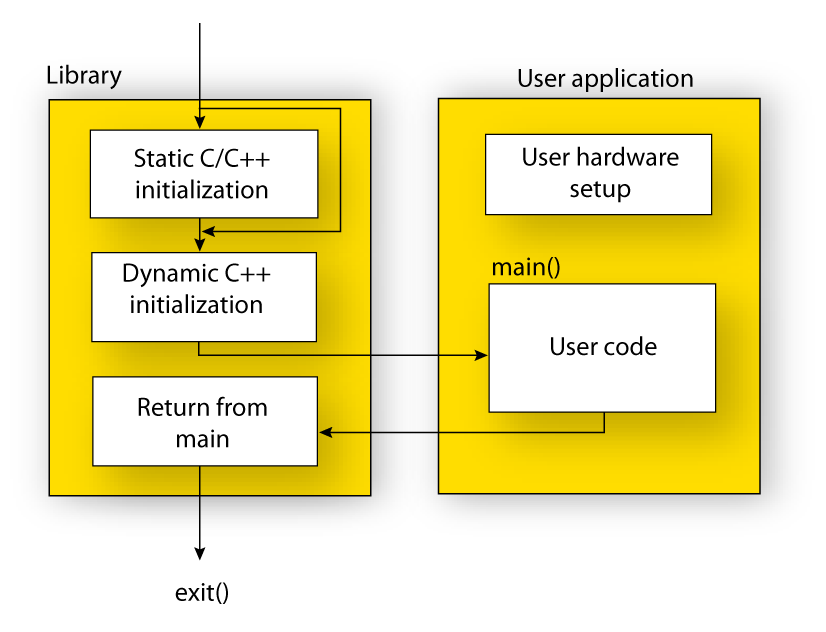
Static and global variables are initialized. That is, zero-initialized variables are cleared and the values of other initialized variables are copied from ROM to RAM memory. This step is skipped if
__low_level_initreturns zero. For more information, see Initialization at system startup.Static C++ objects are constructed
The
mainfunction is called, which starts the application.
For information about the initialization phase, see Application execution—an overview.
System termination
This illustration shows the different ways an embedded application can terminate in a controlled way:
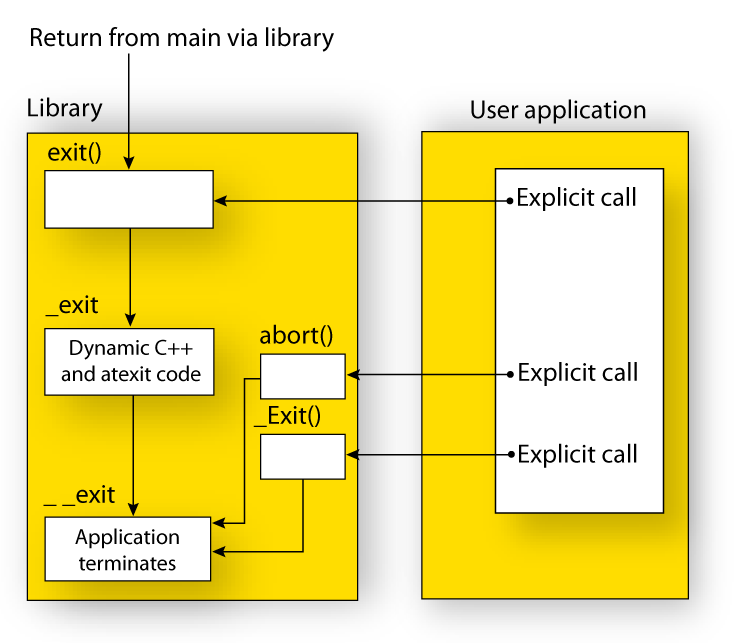
An application can terminate normally in two different ways:
Because the C standard states that the two methods should be equivalent, the system startup code calls the exit function if main returns. The parameter passed to the exit function is the return value of main.
The default exit function is written in C. It calls a small assembler function _exit that will:
Call functions registered to be executed when the application ends. This includes C++ destructors for static and global variables, and functions registered with the standard function
atexit. See also Setting up the atexit limit.Close all open files
When
__exitis reached, stop the system.
An application can also exit by calling the abort, the _Exit, or the quick_exit function. The abort function just calls __exit to halt the system, and does not perform any type of cleanup. The _Exit function is equivalent to the abort function, except for the fact that _Exit takes an argument for passing exit status information. The quick_exit function is equivalent to the _Exit function, except that it calls each function passed to at_quick_exit before calling __exit.
If you want your application to do anything extra at exit, for example, resetting the system (and if using atexit is not sufficient), you can write your own implementation of the __exit(int) function.
The library files that you can override with your own versions are located in the rh850\src\lib directory. See Overriding library modules.
C-SPY debugging support for system termination
If you have enabled C-SPY emulated I/O during linking, the normal __exitand abort functions are replaced with special ones. C-SPY will then recognize when those functions are called and can take appropriate actions to emulate program termination. For more information, see Briefly about C-SPY emulated I/O.