Multicore
What do you want to do?
Learn about:
Learn how to:
Get reference information about the Multicore options, see below the line.

The Multicore options configure multicore debugging.
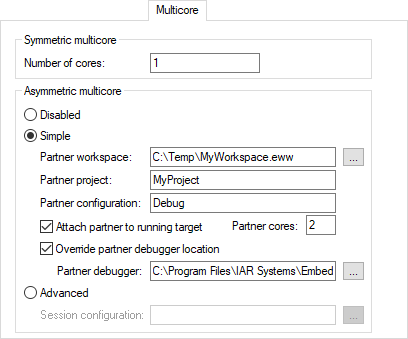
Number of cores
For symmetric multicore debugging, specify the number of cores on your device. For asymmetric multicore debugging, specify the number of cores in the master project. (Normally, this will be 1.)
Disabled
Selecting this option makes the debug session symmetric multicore.
Simple
Selecting this option makes the debug session an asymmetric multicore debugger master. When you start a debug session, a new instance of the IAR Embedded Workbench IDE will be started, using the following options:
- Partner workspace
Specify the workspace to be opened in the partner (slave) instance.
- Partner project
Specify the name of the project in the workspace to be opened in the partner instance. For example, if the project filename is
MyPartnerProj.ewp, specifyMyPartnerProj.
- Partner configuration
Specify the build configuration to be used when debugging the partner. For example,
DebugorRelease.
- Attach partner to running target
If you have selected the command Attach to Running Target from the Project menu, which affects the master. You can also select Attach partner to running target to also make the debugger attach the partner to the running application at its current location, without resetting the target system.
For information about Attach to Running Target, see under Project menuProject menu.
- Partner cores
Specify the number of cores in the partner project.
- Override partner debugger location
If the Embedded Workbench instance associated with the partner project is not installed in the same location as the Embedded Workbench instance associated with the master project, for example in
c:\iar\ewriscv-x.x, you must specify the installation directory of the Embedded Workbench for the partner project. Note that the Embedded Workbench must be based on version 9.1.7 or later of the shared components—to check this, choose Help>About>Product Info.
Advanced
Selecting this option makes the debug session asymmetric multicore with one or more new instances of the IAR Embedded Workbench IDE.
- Session configuration
Use the browse button to specify the XML multicore session file that contains the settings for the debug session. For more information about this file, see The multicore session file.