Setup
What do you want to do?
Learn how to:
Get reference information about the Setup options, see below the line.

The general Setup options select the C-SPY driver, the setup macro file, and device description file to use, and specify which default source code location to run to.
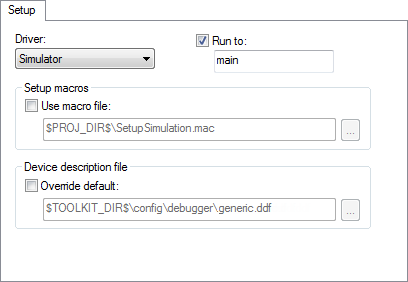
Driver
Selects the C-SPY driver for the target system you have.
Run to
Specifies the location C-SPY runs to when the debugger starts after a reset. By default, C-SPY runs to the main function.
To override the default location, specify the name of a different location you want C-SPY to run to. You can specify assembler labels or whatever can be evaluated as such, for example function names.
If the option is deselected, the program counter will contain the regular hardware reset address at each reset.
See also Executing from reset.
Setup macros
Registers the contents of a setup macro file in the C-SPY startup sequence. Select Use macro file and specify the path and name of the setup file, for example SetupSimple.mac. If no extension is specified, the extension mac is assumed. A browse button is available.
Device description file
A default device description fileis selected automatically based on your project settings. To override the default file, select Override default and specify an alternative file. A browse button is available.
For information about the device description file, see Modifying a device description file.