Trace Settings button in the IDE toolbar
In this section:
During a debug session using a C-SPY driver, a debug probe, and a device that all support trace, this button is added to the toolbar in the main Embedded Workbench IDE window:
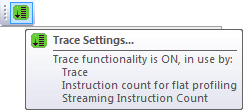
Click this button to open the Trace Settings dialog box, see Trace Settings dialog box. Hover over the button to get information about whether trace is on or off and which functionality that is used. The button is green when trace is enabled and gray when it is disabled.