Statics window
What do you want to do?
Learn about:
Learn how to:
Get reference information about the Statics window, see below the line.

The Statics window is available from the View menu.
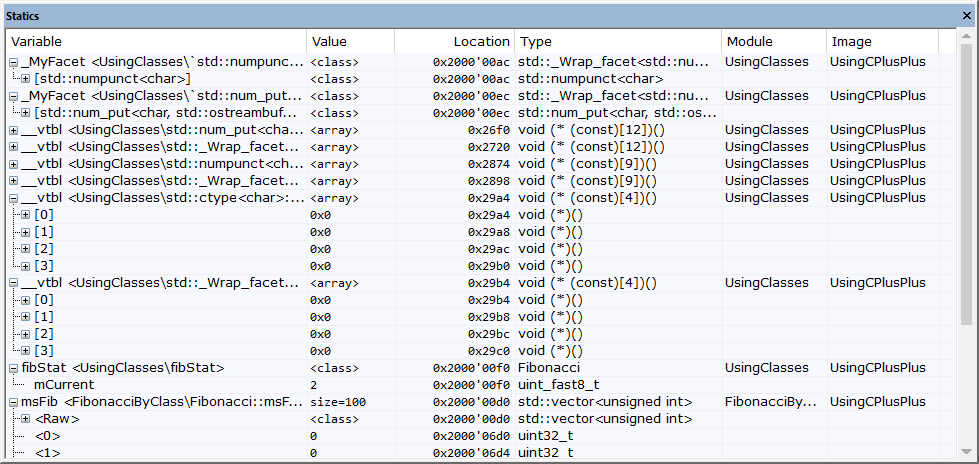
This window displays the values of variables with static storage duration that you have selected. Typically, that is variables with file scope but it can also be static variables in functions and classes. Note that volatile declared variables with static storage duration will not be displayed.
Every time execution in C-SPY stops, the values in the Statics window are recalculated. Values that have changed since the last stop are highlighted in red.
Click any column header (except for Value) to sort on that column.
In the window, right-click and choose Select Statics from the context menu. The window now lists all variables with static storage duration.
Either individually select the variables you want to display, or choose one of the Select commands from the context menu.
When you have made your selections, choose Select Statics from the context menu to toggle back to normal display mode.
Context menu
This context menu is available:
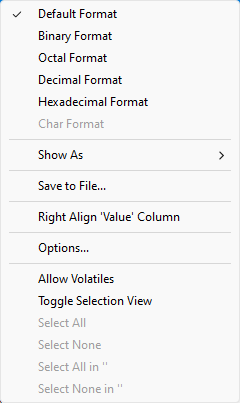
These commands are available:
- Default Format, Binary Format, Octal Format, Decimal Format, Hexadecimal Format, Char Format
Changes the display format of expressions. The display format setting affects different types of expressions in different ways. Your selection of display format is saved between debug sessions. These commands are available if a selected line in the window contains a variable.
The display format setting affects different types of expressions in these ways:
Variables
The display setting affects only the selected variable, not other variables.
Array elements
The display setting affects the complete array, that is, the same display format is used for each array element.
Structure fields
All elements with the same definition—the same field name and C declaration type—are affected by the display setting.
- Show As
Displays a submenu that provides commands for changing the default type interpretation of variables. The commands on this submenu are mainly useful for assembler variables—data at assembler labels—because these are, by default, displayed as integers. For more information, see Viewing assembler variables.
- Save to File
Saves the content of the Statics window to a log file.
- Right Align 'Value' Column
Toggles the left–right alignment of the Value column.
- Options
Opens the IDE Options dialog box on the Debugger category. See Debugger options for more information.
- Allow Volatiles
Toggles the display of volatile variables in the window. When displayed, volatile variables can be recognized by the text in the Type column being in bold and italic.
- Toggle Selection View
Toggling this command to its selected setting adds a selection box for every displayed variable, that can be used for hiding variables that you are not interested in. By default all variables are selected. The ones you deselect will be hidden when you choose this command again to toggle the command to its deselected setting.
- Select All
Selects all variables.
- Select None
Deselects all variables.
- Select All in module
Selects all variables in the selected module.
- Select None in module
Deselects all variables in the selected module.