The checks and their documentation
A check is a programmatic way of identifying deviations from a rule. Each check has a:
Tag, a unique identifier which is used for referring to the check. For example,
ARR-inv-index-pos.Default activation, which can be one of Yes or No.
Synopsis, for example,
Array access may be out of bounds, depending on which path is executed.Severity level, which can be Low, Medium, or High.
In addition, the documentation for each check provides information about any vulnerabilities it identifies and a description of the problems that can be caused by code that fails the check, such as memory leaks, undefined or unpredictable behavior, or program crashes. Usually, there are also two source code examples: one that illustrates code that fails the check and generates a message, and one that illustrates code that passes the check. For each check, there is also information about which rules in the different coding standards that the check corresponds to.
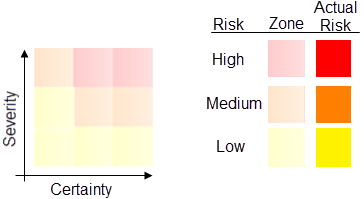
A grid shows the severity of the problems that code that does not conform to the rule (non-conformant code) can cause, and the level of certainty that the message reflects a true error in the source code. The grid is divided into three zones—indicated with pale colors—that reflect the risks based on the severity and certainty. The actual risk for a specific check is indicated with a grid cell in strong color.
 |
Note
Some C-STAT checks cannot be definitively resolved during static analysis. C-STAT adopts a conservative approach to the rules for these checks, to avoid generating numerous false positives. This is especially relevant for rules that depend on inter-procedural analysis and rules evaluated during link analysis. As a consequence, some instances of non-conformant code might pass C-STAT checks.
Here follow some example grids.
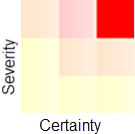
Example 1—high severity and high certainty = high risk
This grid shows a check with high severity and high certainty, which means that it very likely indicates a true bug. While all messages should be investigated, those with a high certainty are more likely to identify real problems in your source code.
 |
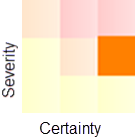
Example 2—medium severity and high certainty = medium risk
This grid shows a check with medium severity and high certainty. A medium severity indicates that, for the code that fails the check, there is a medium risk of causing serious errors in your application. A high certainty means that it is very likely that the message reflects a true positive.
 |
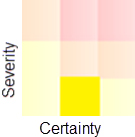
Example 3—low severity and medium certainty = low risk
This grid shows a check with low severity and medium certainty, which indicates that the code probably is safe to use. That the check fails can be due to an offense in a macro, or programmers writing safe, but unusual code.
 |