- IAR Embedded Workbench for RISC-V 3.40
- IDE Project Management and Building
- Project management
- Reference information on managing projects
- Version Control System menu for Subversion
Version Control System menu for Subversion
The Version Control System submenu is available from the Project menu and from the context menu in the Workspace window.
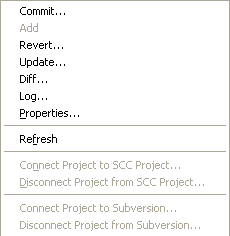
For more information about interacting with an external version control system, see The IDE interacting with version control systems.
Menu commands
These commands are available for Subversion:
- Commit
Displays Tortoise’s Commit dialog box for the selected file(s).
- Add
Displays Tortoise’s Add dialog box for the selected file(s).
- Revert
Displays Tortoise’s Revert dialog box for the selected file(s).
- Update
Opens Tortoise’s Update window for the selected file(s).
- Diff
Opens Tortoise’s Diff window for the selected file(s).
- Log
Opens Tortoise’s Log window for the selected file(s).
- Properties
Displays information available in the version control system for the selected file.
- Refresh
Updates the version control system display status for all files that are part of the project. This command is always enabled for all projects under the version control system.
- Connect Project to Subversion
Checks whether
svn.exeandTortoiseProc.exeare in the path and then enables the connection between the IAR Embedded Workbench project and an existing checked-out working copy. After this connection has been created, a special column that contains status information appears in the Workspace window. Note that you must check out the source files from outside the IDE.