Terminal I/O options
What do you want to do?
Learn about the Terminal I/O window, see the debugger documentation in the online help system
Get reference information about the Terminal I/O tool options, see below the line.

The Terminal I/O options are available by choosing Tools>Options when C-SPY is running.
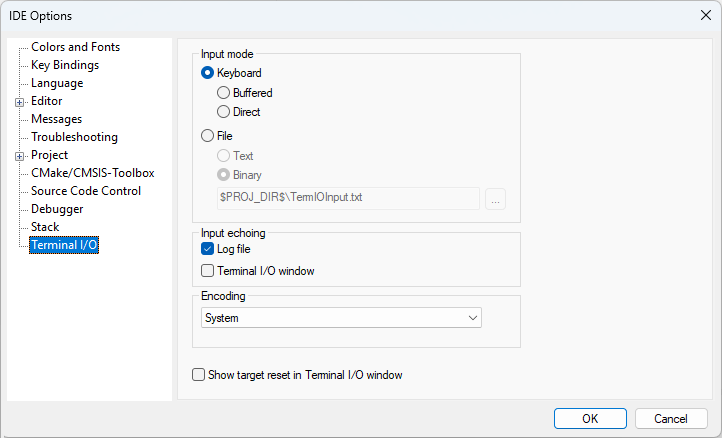
Use this page to configure the C-SPY terminal I/O functionality.
Input mode
Controls how the terminal I/O input is read. Choose between:
- Keyboard
Makes the input characters be read from the keyboard. Choose between:
Buffered, Buffers input characters
Direct, Does not buffer input characters
- File
Makes the input characters be read from a file. Choose between:
Text, Reads input characters from a text file
Binary, Reads input characters from a binary file
A browse button is available for locating the input file.
Input echoing
Determines whether to echo the input characters and where to echo them. Choose between:
- Log file
Echoes the input characters in the Terminal I/O log file. Requires that you have enabled the option Debug>Logging>Set Terminal I/O Log File>Enable Terminal I/O log file.
- Terminal I/O window
Echoes the input characters in the Terminal I/O window.
Encoding
Determines the encoding used for terminal input and output. Choose between:
| System (uses the Windows settings) |
| Western European |
| UTF-8 |
| Japanese (Shift-JIS) |
| Chinese Simplified (GB2312) |
| Chinese Traditional (Big5) |
| Korean (Unified Hangul Code) |
| Arabic |
| Central European |
| Greek |
| Hebrew |
| Thai |
| Baltic |
| Russian |
| Vietnamese |
Show target reset in Terminal I/O window
Displays a message in the C-SPY Terminal I/O window when the target resets.