Breakpoint icons
In this section:
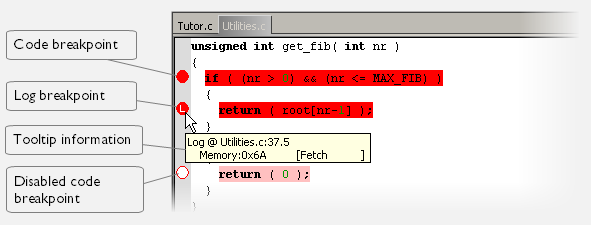
A breakpoint is marked with an icon in the left margin of the editor window, and the icon varies with the type of breakpoint:
Tip
If the breakpoint icon does not appear, make sure the option Show bookmarks is selected, see Editor options.
Tip
Just point at the breakpoint icon with the mouse pointer to get detailed tooltip information about all breakpoints set on the same location. The first row gives user breakpoint information, the following rows describe the physical breakpoints used for implementing the user breakpoint. The latter information can also be seen in the Breakpoint Usage window.
Note
The breakpoint icons might look different for the C-SPY driver you are using.