- IAR Embedded Workbench for RL78 5.20
- IDE Project Management and Building
- Editing
- Reference information on the editor
- Incremental Search dialog box
Incremental Search dialog box
What do you want to do?
Learn how to: Text searching
Get reference information about the Incremental Search dialog box, see below the line.

The Incremental Search dialog box is available from the Edit menu.
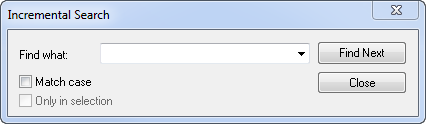
Use this dialog box to gradually fine-tune or expand the search string.
Find what
Type the string to search for. The search is performed from the location of the insertion point—the start point. Every character you add to or remove from the search string instantly changes the search accordingly. If you remove a character, the search starts over again from the start point.
If a word in the editor window is selected when you open the Incremental Search dialog box, this word will be displayed in the Find What text box.
Use the drop-down list to use old search strings.
Match case
Searches for occurrences that exactly match the case of the specified text. Otherwise, searching for int will also find INT and Int.
Find Next
Searches for the next occurrence of the current search string. If the Find What text box is empty when you click the Find Next button, a string to search for will automatically be selected from the drop-down list. To search for this string, click Find Next.
Close
Closes the dialog box.
Only in selection
Limits the search operation to the selected lines. The option is only available when more than one line has been selected before you open the dialog box.