C-RUN Messages window
What do you want to do?
Learn about:
Learn how to:
Get reference information about the C-RUN Messages window, see below the line.

The C-RUN Messages window is available from the View menu.
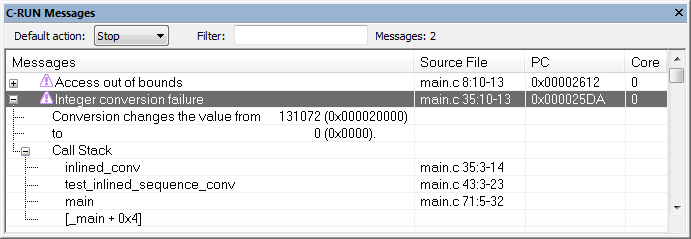
This window displays information about runtime errors detected by a runtime check. The window groups messages that have the same source statement, the same call stack, and the same messages.
Requirements
A license for the C-RUN product.
Toolbar
The toolbar contains:
- Default action
Sets the default action for what happens if no other rule is satisfied. Choose between Stop, Log, and Ignore.
- Filter
Filters the list of messages so that only messages that contain the text you specify will be listed. This is useful if you want to search the message text, call stack entries, or filenames.
- Messages
Lists the number of C-RUN messages.
Display area
The display area shows all detected errors since the last reset. More specifically, the display area provides information in these columns:
- Messages
Information about the detected runtime error. Each message consists of a headline, detailed information about the error, and call stack information for the error location. Note that ranges displayed for accesses and bounds include the start address but not the end address.
- Source File
The name of the source file in which a runtime error was detected, or otherwise a relevant location, for example variable definitions.
- PC
The value of
PCwhen the runtime error was detected.
Context menu
This context menu is available:
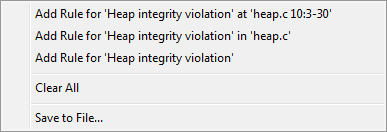
These commands are available:
- Add Rule for ... at range
Adds a rule that matches this particular runtime check at this particular location.
- Add Rule for ... in filename
Adds a rule that matches all runtime checks of this kind in the specified file.
- Add Rule for ...
Adds a rule that matches all runtime checks of this kind.
- Clear All
Clears the window from all content.
- Save to File
Opens a dialog box where you can choose to save content to a file, either in text or XML format.