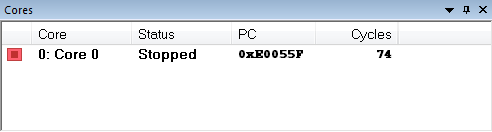
This window displays information about the executing core, such as its execution state. This information is primarily useful for IAR Embedded Workbench products that support multicore debugging.
Display area
A row in this area shows information about a core, in these columns:
Execution state
Displays one of these icons to indicate the execution state of the core:
in focus, not executing
not in focus, not executing
in focus, executing
not in focus, executing
in focus, unknown status
not in focus, unknown status
Core
The name of the core.
Status
The status of the execution, which can be one of Stopped, Running, Sleeping, or Unknown.
PC
The value of the program counter.
Cycles | Time
The value of the cycle counter or the execution time since the start of the execution, depending on the debugger driver you are using.
Context menu
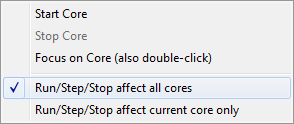
For symmetric multicore debugging, this context menu is available:
These commands are available:
Start Core
Starts the selected core.
Stop Core
Stops the selected core.
Focus on Core (also double-click)
Focuses on the selected core.
Run/Step/Stop affect all cores
The Run, Step, Stop commands affect all cores.
Run/Step/Stop affect current core only
The Run/Step/Stop commands only affect the current core. This menu command is only supported if your device supports it.
Note
These commands are not supported by all target hardware.