- IAR Embedded Workbench for RX 5.20
- C-SPY Debugging
- Executing your application
- Reference information on application execution
- Start/Stop Function Settings dialog box
Start/Stop Function Settings dialog box
The Start/Stop Function Settings dialog box is available from the C-SPY Driver menu.
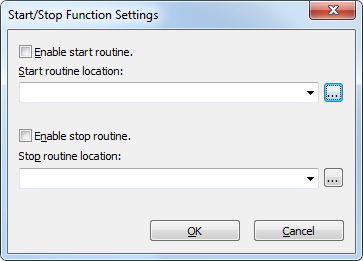
Use this dialog box to configure the emulator to execute specific routines of your application immediately before the execution starts and/or after it halts. This is useful if you want to control your system in synchronization with starting and stopping the execution of your application.
Requirements
One of these alternatives:
The C-SPY E1/E20 driver
The C-SPY E2/E2 Lite/EZ-CUBE2 driver.
Restrictions on using start/stop routines
Some restrictions apply:
When the start/stop feature is enabled you cannot:
let your application use the RAM area
0x0–0x22F. For example, change the start address forRAM_region16,RAM_region24, andRAM_region32from0x4to0x230in the linker configuration file.set memory or download into the program area of a start/stop routine
set breakpoints in the program area of a start/stop routine.
While either of the start/stop routines is running, the four bytes of memory indicated by the interrupt stack pointer are in use by the emulator.
In the start/stop routines, these restrictions apply to registers and flags:
Register and flag names | Restrictions |
|---|---|
| When execution of a start/stop routine is ended, the register must be returned to its value at the time the routine started. |
Flag | While a specified start/stop is running, switching to user mode is prohibited. |
Flag | No interrupts are allowed during execution of a start/stop routine. |
Flag | While a start/stop routine is running, switching to user mode is prohibited. |
When either of the start/stop routines is running, the following does not work:
Trace
Breaks in execution in the start/stop routines
Performance measurement. The start/stop routines are not within the scope of performance measurement.
Events. Event settings are invalid within the start/stop routines.
While either of the start/stop routines is running, non-maskable interrupts are always disabled.
This table shows which state the MCU will be in when your application starts running after executing a start routine:
MCU resource | Status |
|---|---|
MCU general purpose registers | These registers are in the same state as when your application last stopped, or in states determined by the settings in the Registers window. Changes made by the start routine to the contents of registers are not reflected. |
Memory in the MCU space | Accesses to memory after the start routine has finished executing are reflected. |
MCU peripheral functions | The operation of the MCU’s peripheral functions is continued after the start routine has finished executing. |
Enable start routine
Enables the execution of a routine immediately before your application starts executing.
Start routine location
Specifies the routine to be executed immediately before your application starts executing. Type a label or an address, or click the browse button to open the Select Label dialog box, see Select Label dialog box.
Enable stop routine
Enables the execution of a routine immediately after your application stops executing.
Stop routine location
Specifies the routine to be executed immediately after your application stops executing. Type a label or an address, or click the browse button to open the Select Label dialog box, see Select Label dialog box.