- IAR Embedded Workbench for RX 5.20
- C-SPY Debugging
- Interrupts
- Reference information on interrupts
- Interrupt Configuration window
Interrupt Configuration window
What do you want to do?
Learn about:
Learn how to:
Get related information:
Get reference information about the Interrupt Configuration window, see below the line.

The Interrupt Configuration window is available by choosing Simulator>Interrupt Configuration.
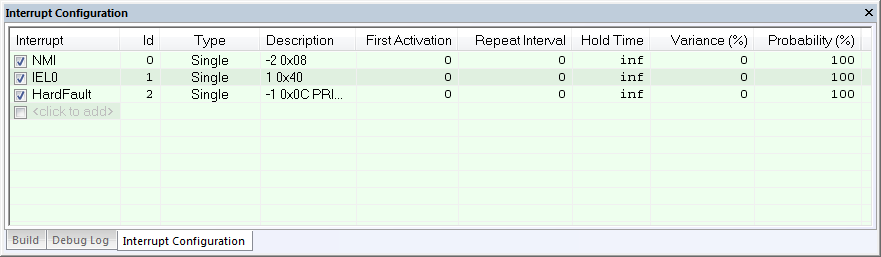
This window lists all installed interrupts. Use this window to enable or disable individual interrupts or the interrupt simulation system, and to edit the properties of installed interrupts.
Requirements
The C-SPY simulator.
Display area
This area contains these columns:
- Interrupt
Lists all installed interrupts. Use the checkbox to enable or disable the interrupt.
- ID
A unique interrupt identifier.
- Type
Shows the type of the interrupt. The type can be one of:
Forced, a single-occasion interrupt defined in the Available Interrupts window.
Single, a single-occasion interrupt.
Repeat, a periodically occurring interrupt.
If the interrupt has been set from a C-SPY macro, the additional part (macro) is added, for example: Repeat(macro).
- Description
A description of the selected interrupt, if available. The description is retrieved from the selected device description file. See this file for a detailed description. For interrupts specified using the system macro
__orderInterrupt, the Description box is empty.
- Variance %
A timing variation range, as a percentage of the repeat interval, in which the interrupt might occur for a period. For example, if the repeat interval is 100 and the variance 5%, the interrupt might occur anywhere between T=95 and T=105, to simulate a variation in the timing. Click to edit.
Context menu
This context menu is available:
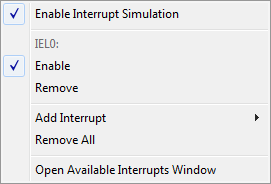
These commands are available:
- Enable Interrupt Simulation
Enables or disables the entire interrupt simulation system. If the interrupt simulation is disabled, the definitions remain but no interrupts are generated. Note that you can also enable and disable installed interrupts individually by using the check box to the left of the interrupt name in the list of installed interrupts.
- Enable
Enables or disables the individual interrupt you clicked on.
- Remove
Removes the individual interrupt you clicked on.
- Remove All
Removes all installed interrupts in the window.
- Open Available Interrupts Window
Opens the Available Interrupts window, see Available Interrupts window.