New Configuration dialog box
What do you want to do?
Learn about project management, see Introduction to managing projects
Learn how to: Managing projects
Get reference information about the New Configuration dialog box, see below the line.

The New Configuration dialog box is available by clicking New in the Configurations for project dialog box.
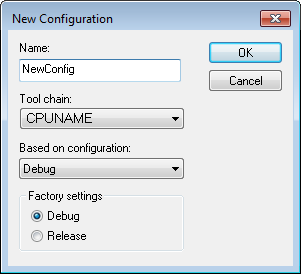
Use this dialog box to define new build configurations—either entirely new, or based on any currently defined configuration.
Name
Type the name of the build configuration.
Tool chain
Specify the target to build for. If you have several versions of IAR Embedded Workbench for different targets installed on your host computer, the drop-down list might contain some or all of these targets.
Based on configuration
Selects a currently defined build configuration to base the new configuration on. The new configuration will inherit the project settings and information about the factory settings from the old configuration. If you select None, the new configuration will be based strictly on the factory settings.
Factory settings
Select the default factory settings that you want to apply to your new build configuration. These factory settings will be used by your project if you click the Factory Settings button in the Options dialog box.
Choose between:
Debug, Factory settings suitable for a debug build configuration.
Release, Factory settings suitable for a release build configuration.