Home view
The Home view of the IAR Secure Deploy – Prototyping application is displayed when you launch the program.
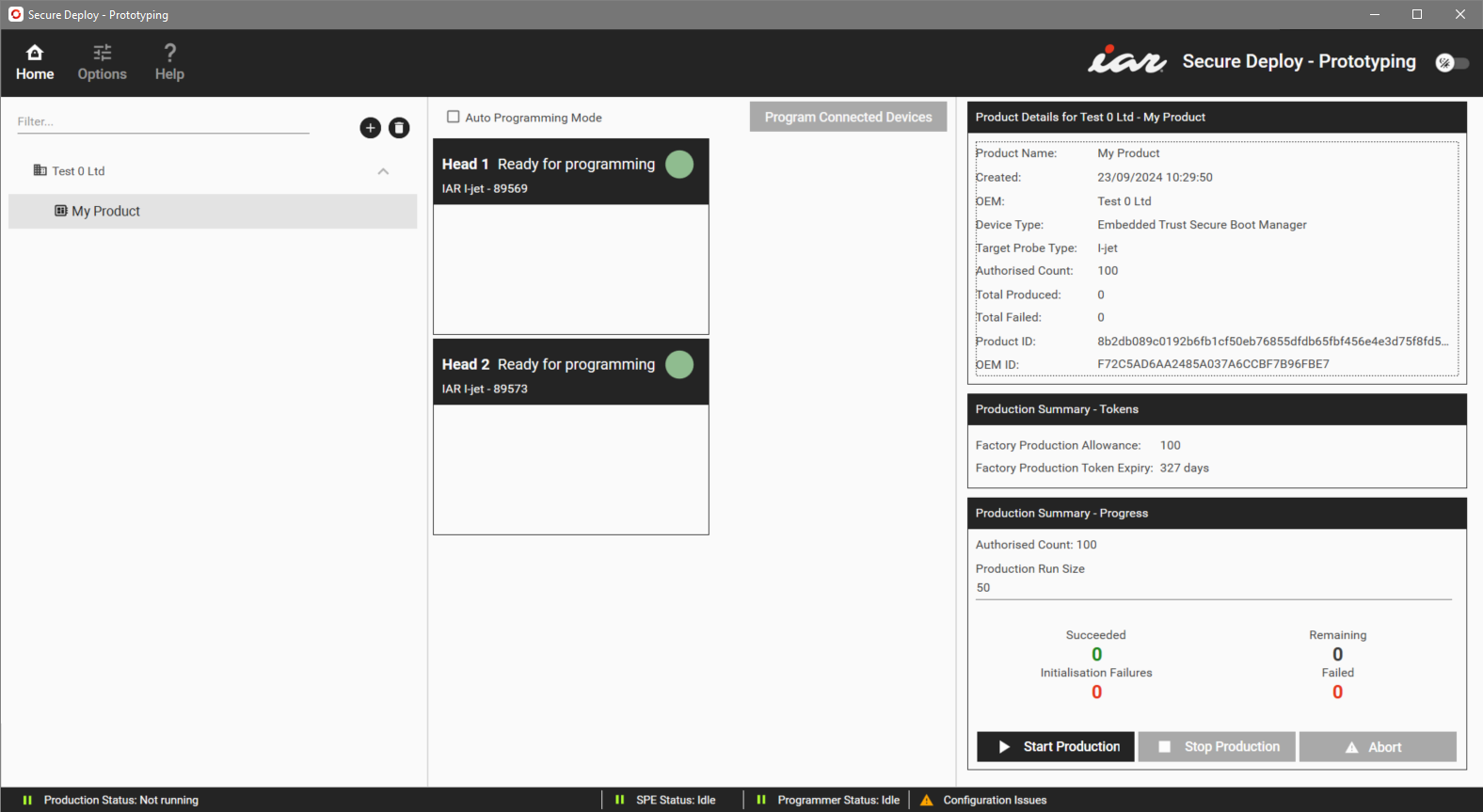
The figure shows the window and its default view.
Filters | Filters the list of product packages so that only product names that contain the text you specify will be listed. |
List of products | This is a list of all product packages you have imported into the IAR Secure Deploy – Prototyping application. Select the one you want to provision to the hardware devices. A Missing Products item means that the product exists in the file store, but not in the Security Appliance. For a single product, the reason is probably that the product has been deleted from the Security Appliance. If all or many products are missing, you might have connected the wrong Security Appliance. |
Add | Imports a product package that contains the application or applications that will run on your device. It will also check that the package has been signed correctly and that its certificates match the connected Security Appliance. |
Delete | Deletes the selected product package from the Security Appliance. Before the deletion takes place, you will asked to confirm the deletion. This option deletes all the products, keys, and count authorizations, meaning that the product can no longer be produced. Warning It is not possible to re-import a deleted product. |
Auto Programming Mode | Enables automatic device provisioning. A device is automatically provisioned when connected to the Security Appliance. |
Program Connected Devices | Makes the connected Security Appliance generate identity keys and inject them into the part. |
Head n boxes | Each box at the bottom of the window represents a hardware programmer. The alphabetic part of the ID identifies the type of programmer. If the hardware programmer is connected to a board, the status is “Ready for programming”, otherwise it is “Insert device”. |


Product Details
To the right of the list of products, details about the selected product are shown:
Product name | The name of the product package. |
Created | The date that the imported product package file was created. The time zone is UTC, regardless of where the system is used. |
OEM | The name of the selected OEM. |
Device type | The type of device, set by the product export process. |
Target probe type | The type of hardware programmer, set by the product export process. The possible types are I-jet (for I-jet debug probes) and RX (for E2 or E2 Lite emulators). |
Authorized Count | This is the number of times that the Security Appliance can provision a device with the selected product package file, set in the product package file. |
Total produced | The total number of provisioned devices for the selected product. |
Total failed | The total number of provisioning failures for the selected product. |
Product ID | The product identity string. It is contained in the loaded product package file. |
OEM ID | The OEM UUID. |
Production Summary
A summary of the production:
Factory Production Allowance | The limit on how many product units that IAR Systems authorizes you to produce, across all devices. If you reach the limit, you can switch to the Options>Tokens category and import a new Factory Production token that you have requested from and acquired from IAR Systems. |
Factory Production Token Expiry | The number of days until the product can no longer be produced. If you reach the limit, you can switch to the Options>Tokens category and import a new Factory Production token that you have requested from and acquired from IAR Systems. |
Authorized Count | This is how many of a certain device the OEM is authorizing the factory to provision. |
Production run size | The number of units that will be provisioned. This must be less than or equal to:
|
Start Production | Downloads the information in the imported package to the Security Appliance and places the system into a secure production mode. |
Stop Production | Stops the provisioning process. |
Abort | Immediately stops programming of the attached devices. This will register as a failure against the product unless you do it during the initialization phase, in which case it will count as an initialization failure instead and not decrease the production allowance. |
Status bar
Displays the status of the IAR Secure Deploy – Prototyping system:
Production status | Shows the status of the current production run. |
SPE status | The operational status of the background service that controls the Security Appliance. |
Programmer status | Shows which state the provisioning process is in. |
Notifications | Any messages generated during operation will be displayed here. |