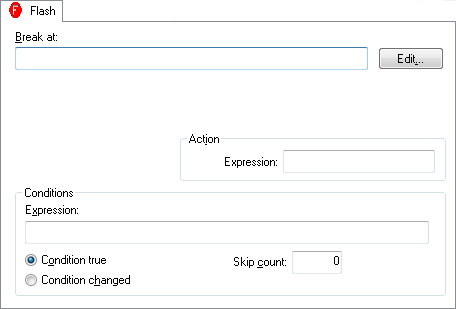
The Flash breakpoints dialog box is available from the context menu in the editor window, the Breakpoints window, the Memory window, and in the Disassembly window.
Use the Flash breakpoints dialog box to set a flash breakpoint.
Requirements
The C-SPY I-jet driver.
Break At
Specify the code location of the breakpoint in the text box. Alternatively, click the Edit button to open the Enter Location dialog box, see Enter Location dialog box.
Action
Specify a valid C-SPY expression, which is evaluated when the breakpoint is triggered and the condition is true. For more information, see Useful breakpoint hints.
The breakpoint is triggered if the value of the expression is true.
Condition changed
The breakpoint is triggered if the value of the expression has changed since it was last evaluated.
Skip count
The number of times that the breakpoint condition must be fulfilled before the breakpoint starts triggering. After that, the breakpoint will trigger every time the condition is fulfilled.