Getting started analyzing using C-STAT
Before you perform a static analysis, make sure your project builds without errors. For information about how to build a project, see Building a project.
Choose Project>Options and select the Static Analysis category. On the C-STAT Static Analysis page, click Select C-STAT Checks.
In the Select C-STAT Checks dialog box, select the packages of checks you want to use. For example STDCHECKS.
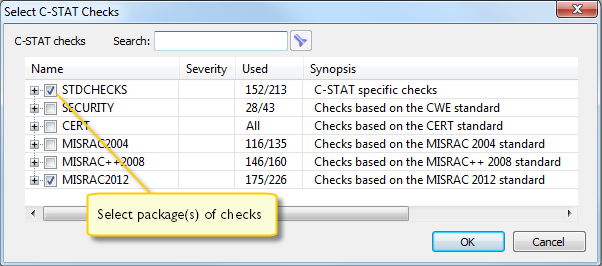
For each package, select groups of checks or individual checks:
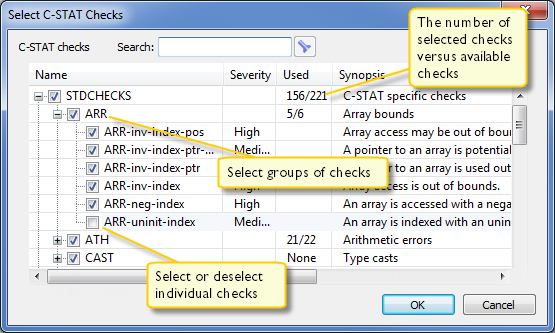
For information about a specific check, select it and press F1 to open the context-sensitive online help system.
When you have made your settings, click OK and then OK again.
To perform an analysis, make sure the project is active and execute one of these steps:
To analyze your project, select the project in the Workspace window and choose Project>C-STAT Static Analysis>Analyze Project.
To analyze one or more individual files, select the file(s) in the Workspace window and choose Project>C-STAT Static Analysis>Analyze File(s).
Alternatively, use the corresponding commands on the context menu in the Workspace window instead.
The result of the performed analysis is listed in the C-STAT Messages window.

For information about a specific check, search for it in the help system.
For reference information, see C-STAT Messages window.
Note
If there are any problems when analyzing, the Build Log window displays detailed information.
Double-click a C-STAT message to view the corresponding source code in the editor window:
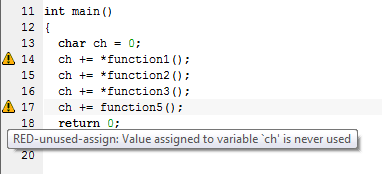
Point at a message with the mouse pointer to get tooltip information about which check that caused the message.
Correct the error and click the next message in the C-STAT Messages window. Continue until all messages have been processed.
Note
C-STAT has a predefined macro,
__CSTAT__, that you can use to explicitly include or exclude specific parts of source code from the analysis, see __CSTAT__. There are also specific C-STAT pragma directives that suppress one or more checks for selected source lines, see Descriptions of compiler extensions for C-STAT.