C-STAT Messages window
The C-STAT Messages window is automatically displayed when you perform a C-STAT analysis.
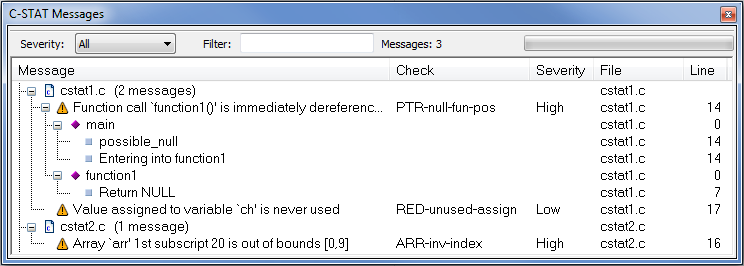
This window displays the result of a performed C-STAT static analysis.
See also Getting started analyzing using C-STAT.
Toolbar menu
- Severity
Selects which severity level of the messages to be displayed. Choose between All (shows all messages), Medium/High (shows messages of Medium and High severity), or High (shows only messages of High severity).
- Filter
Filters the messages so that only messages that contain the text you specify will be listed (the filter is case-sensitive). This is useful if you want to search the message information.
- Messages
Lists the number of C-STAT messages after a performed analysis.
- Progress bar
Shows the progress of the ongoing analysis.
Display area
The display area shows messages per file and linkage. The messages can be expanded and collapsed. For each file, the number of messages and the number of C-STAT pragma messages are displayed
- Message
Lists the C-STAT message for the check. For some checks, there is trace information for an execution path that was used when identifying the non-conformant code construct.
- Check
The name of the check.
- Severity
The severity of the check, High, Medium, or Low.
- File
The name of the file where the non-conformant code construct is found.
- Line
The line number of the non-conformant code construct.
Context menu
This context menu is available:
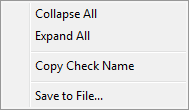
These commands are available:
- Collapse All
Collapses all file nodes in the C-STAT Messages window.
- Expand All
Expands all file nodes in the C-STAT Messages window.
- Copy Check Name
Copies the name of the selected check. Use the copied name in the C-STAT Settings dialog box to search for a specific check.
- Save to File
Saves the result of a performed analysis to a text file.