Introduction to interrupts
Briefly about the interrupt simulation system
By simulating interrupts, you can test the logic of your interrupt service routines and debug the interrupt handling in the target system long before any hardware is available. If you use simulated interrupts in conjunction with C-SPY macros and breakpoints, you can compose a complex simulation of, for instance, interrupt-driven peripheral devices.
The C-SPY Simulator includes an interrupt simulation system where you can simulate the execution of interrupts during debugging. You can configure the interrupt simulation system so that it resembles your hardware interrupt system.
The interrupt system has the following features:
Simulated interrupt support for RISC-V
Single-occasion or periodical interrupts based on the cycle counter
Predefined interrupts for various devices
Configuration of hold time, probability, and timing variation
State information for locating timing problems
Configuration of interrupts using a dialog box or a C-SPY system macro—that is, one interactive and one automating interface. In addition, you can instantly force an interrupt.
A log window that continuously displays events for each defined interrupt.
A status window that shows the current interrupt activities.
All interrupts you define using the Interrupt Configuration window are preserved between debug sessions, unless you remove them. A forced interrupt, on the other hand, exists only until it has been serviced and is not preserved between sessions.
Tip
The interrupt simulation system is activated by default, but if not required, you can turn off the interrupt simulation system to speed up the simulation. To turn it off, use either the Interrupt Configuration window or a system macro.
Interrupt characteristics
The simulated interrupts consist of a set of characteristics which lets you fine-tune each interrupt to make it resemble the real interrupt on your target hardware. You can specify a first activation time, a repeat interval, a hold time, a variance, and a probability.
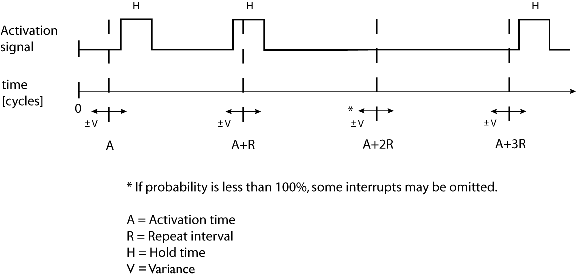
The interrupt simulation system uses the cycle counter as a clock to determine when an interrupt should be raised in the simulator. You specify the first activation time, which is based on the cycle counter. C-SPY will generate an interrupt when the cycle counter has passed the specified activation time. However, interrupts can only be raised between instructions, which means that a full assembler instruction must have been executed before the interrupt is generated, regardless of how many cycles an instruction takes.
To define the periodicity of the interrupt generation you can specify the repeat interval which defines the amount of cycles after which a new interrupt should be generated. In addition to the repeat interval, the periodicity depends on the two options probability—the probability, in percent, that the interrupt will actually appear in a period—and variance—a time variation range as a percentage of the repeat interval. These options make it possible to randomize the interrupt simulation. You can also specify a hold time which describes how long the interrupt remains pending until removed if it has not been processed. If the hold time is set to infinite, the corresponding pending bit will be set until the interrupt is acknowledged or removed.
Interrupt simulation states
The interrupt simulation system contains status information that you can use for locating timing problems in your application. The Interrupt Status window displays the available status information. For an interrupt, these states can be displayed: Idle, Pending, Executing, or Suspended.
Normally, a repeatable interrupt has a specified repeat interval that is longer than the execution time. In this case, the status information at different times looks like this:
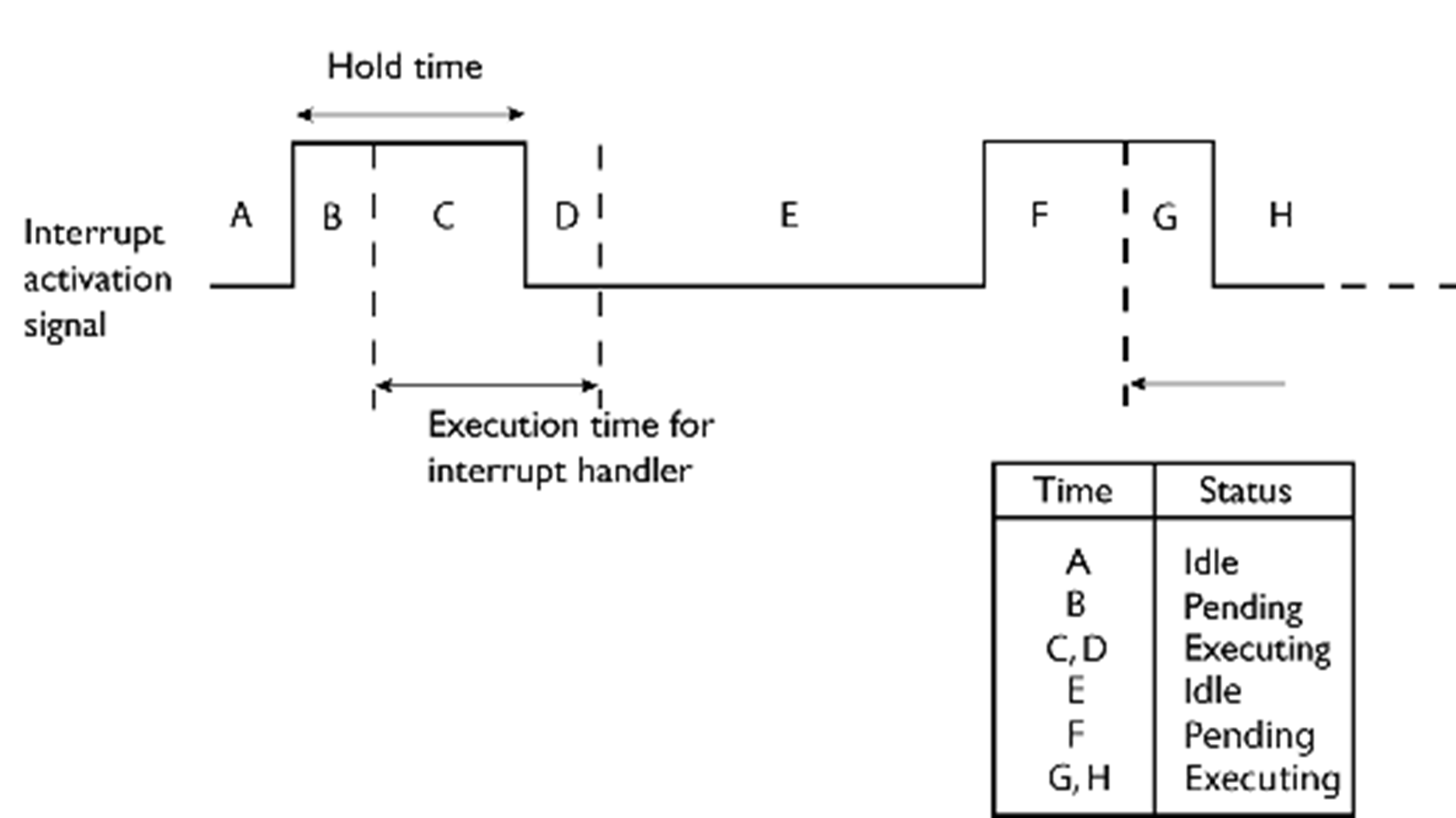
However, if the interrupt repeat interval is shorter than the execution time, and the interrupt is reentrant (or non-maskable), the status information at different times looks like this:

An execution time that is longer than the repeat interval might indicate that you should rewrite your interrupt handler and make it faster, or that you should specify a longer repeat interval for the interrupt simulation system.
C-SPY system macros for interrupt simulation
Macros are useful when you already have sorted out the details of the simulated interrupt so that it fully meets your requirements. If you write a macro function containing definitions for the simulated interrupts, you can execute the functions automatically when C-SPY starts. Another advantage is that your simulated interrupt definitions will be documented if you use macro files, and if you are several engineers involved in the development project you can share the macro files within the group.
The C-SPY Simulator provides these predefined system macros related to interrupts:
__cancelAllInterrupts__cancelInterrupt__disableInterrupts__enableInterrupts__orderInterrupt__popSimulatorInterruptExecutingStack
The parameters of the first five macros correspond to the equivalent entries of the Interrupt Configuration window.
For more information about each macro, see Reference information on C-SPY system macros.
Target-adapting the interrupt simulation system
The interrupt simulation system is easy to use. However, to take full advantage of the interrupt simulation system you should be familiar with how to adapt it for the processor you are using.
The interrupt simulation has the same behavior as the hardware. This means that the execution of an interrupt is dependent on the status of the global interrupt enable bit. The execution of maskable interrupts is also dependent on the status of the individual interrupt enable bits.
To simulate device-specific interrupts, the interrupt system must have detailed information about each available interrupt. This information is provided in the device description files.
For information about device description files, see Selecting a device description file.
Briefly about interrupt logging
Interrupt logging provides you with comprehensive information about the interrupt events. This might be useful, for example, to help you locate which interrupts you can fine-tune to become faster. You can log entrances and exits to and from interrupts. You can also log internal interrupt status information, such as triggered, expired, etc. In the IDE:
The logs are displayed in the Interrupt Log window
A summary is available in the Interrupt Log Summary window
The Interrupt graph in the Timeline window provides a graphical view of the interrupt events during the execution of your application
Requirements for interrupt logging
Interrupt logging is supported by the C-SPY simulator.
See also Getting started using interrupt logging.