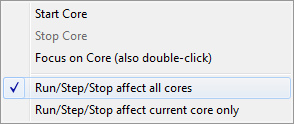
Cores window
What do you want to do?
Learn about:
Learn how to:
Get reference information about the Cores window, see below the line.

The Cores window is available from the View menu.
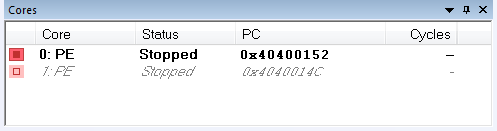
This window shows a list of all available cores, and gives some information about each core, such as its execution state. The line highlighted in bold is the core currently in focus, which means that any window showing information that is specific to a core will be updated to reflect the state of the core in focus. This includes highlights in editor windows and the Disassembly, Registers, Watch, Locals, Call Stack window, and so on. Double-click a line to focus on that core.
Note
For asymmetric multicore debugging, only local cores can be in focus.
See also Debugging multiple cores.
Display area
A row in this area shows information about a core, in these columns: