Multicore toolbar
In this section:
The Multicore toolbar can be toggled on/off from the Window>Toolbars submenu when you have enabled multicore debugging, see Setting up for asymmetric multicore debugging.
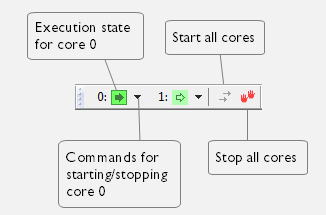
This toolbar is a complement to and shows the same state as the Cores window. Each core has a button with an adjacent drop-down menu. Click a button to make C-SPY focus on that core.
Note
You can use the toolbar commands to start and stop cores in the associated debugging session.