Working with variables and expressions
See also Analyzing your application’s timeline.
Viewing assembler variables
An assembler label does not convey any type information at all, which means C-SPY cannot easily display data located at that label without getting extra information. To view data conveniently, C-SPY by default treats all data located at assembler labels as variables of type int. However, in the Watch, Live Watch, and Quick Watch windows, you can select a different interpretation to better suit the declaration of the variables.
In this figure, you can see four variables in the Watch window and their corresponding declarations in the assembler source file to the left:
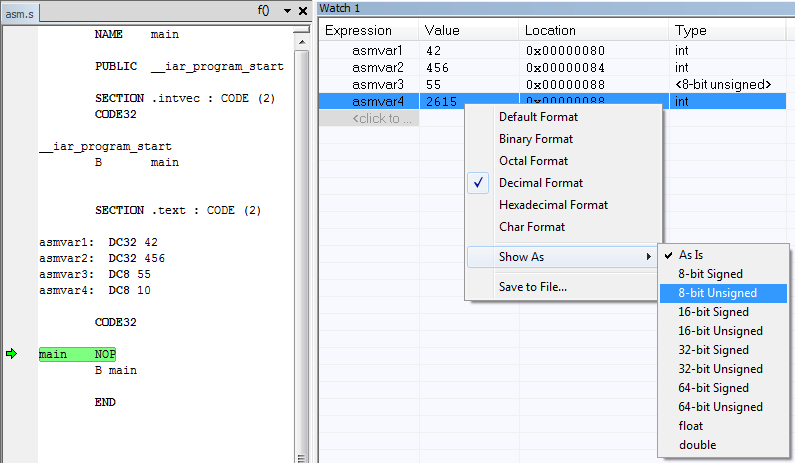
Note that asmvar4 is displayed as an int, although the original assembler declaration probably intended for it to be a single byte quantity. From the context menu you can make C-SPY display the variable as, for example, an 8-bit unsigned variable. This has already been specified for the asmvar3 variable.