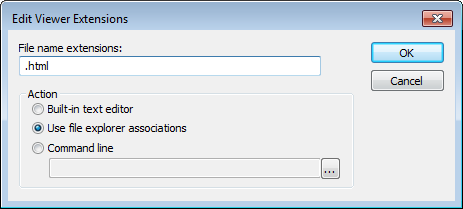
The Edit Viewer Extensions dialog box is available from the Configure Viewers dialog box.
Use this dialog box to specify how to open a new document type or edit the setting for an existing document type.
File name extensions
Specify the filename extension for the document type—including the separating period (.).
Action
Selects how to open documents with the filename extension specified in the Filename extensions text box. Choose between:
Built-in text editor
Opens all documents of the specified type with the IAR Embedded Workbench text editor.
Use file explorer associations
Opens all documents of the specified type with the default application associated with the specified type in Windows Explorer.
Command line
Opens all documents of the specified type with the viewer application you type or browse your way to. You can give any command line options you would like to the tool, for instance, type $FILE_PATH$ after the path to the viewer application to start the viewer with the active file (in editor, project, or messages windows).