Target options
The Target options specify target-specific features for the IAR C/C++ Compiler and Assembler.
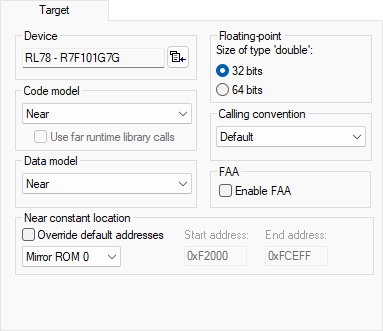
Device
The device your are using. The choice of device will automatically determine the default linker configuration file and C-SPY® device description file. For information about how to override the default files, see the C-SPY Debugging documentation.
Code model
Selects the code model for your project. Choose between:
- Near
Function calls reach the first 64 Kbytes of memory.
- Far
Function calls reach the entire 1 Mbytes of memory.
For more information about the code models, see Code models and memory attributes for function storage.
Use far runtime library calls
Places the runtime library support routines in __far_func memory. This option can be used for moving the support routines from near to far memory when building a customized library. Note that the startup code will still be located in near memory.
Data model
Selects the data model for your project. Choose between:
- Near
Data is placed in the highest 64 Kbytes of memory.
- Far
Data is placed in the entire 1 Mbytes of memory.
For more information about the data models, see Data models.
Near constant location
Specify the location for __near-declared constants and strings:
- Override default addresses
Makes it possible to override the default start and end addresses for where in the RAM the constants shall be placed.
- Copy to RAM
Constants are located in RAM, in the range
0xF0000–0xFFFFF
- Mirror ROM0
Constants are located in ROM, in the range
0x00000–0x0FFFF, and are mirrored by hardware to RAM, in the range0xF0000–0xFFFFF
- Mirror ROM1
Constants are located in ROM, in the range
0x10000–0x1FFFF, and are mirrored by hardware to RAM, in the range0xF0000–0xFFFFF
- Start address
Type an address to override the default start address for where in the RAM the constants shall be placed.
- End address
Type an address to override the default end address for where in the RAM the constants shall be placed.
For information about how this works and the available memory ranges, see the chip manufacturer’s documentation.
Floating-point
The compiler represents floating-point values by 32- and 64-bit numbers in standard IEEE 754 format. Size of type 'double' selects the size of the type double. Choose between:
- 32 bits
The data type
doubleis represented by the 32-bit floating-point format.
- 64 bits
The data type
doubleis represented by the 64-bit floating-point format.
For more information about the floating-point format, see Basic data types—floating-point types.
Calling convention
Selects the calling convention for your project. Choose from:
- Default
The default (V2) calling convention complies with the RL78 ABI and is recommended when you link with code produced by a tool from another vendor.
- Legacy (V1.xx)
The legacy (V1) calling convention should only be used when you need compatibility with the IAR C/C++ Compiler for RL78 version 1.40.x.
For more information about the calling conventions, see Choosing a calling convention.
Enable FAA
Enables the integrated Renesas FAA (Flexible Application Accelerator) Assembler. The Renesas FAA Assembler generates output for Renesas RL78 GREEN DSP cores that can be linked with the IAR ILINK Linker and debugged with the IAR C-SPY debugger (at a basic level).
When this option is selected, settings for the FAA Assembler become available in the Options dialog box, see FAA Assembler options. Note that project files (.ewp) opened with FAA support will be upgraded and no longer possible to open with the regular version of IAR Embedded Workbench for RL78.