Options : Tokens
The Options>Tokens category is available by clicking Options and selecting the Tokens tab.
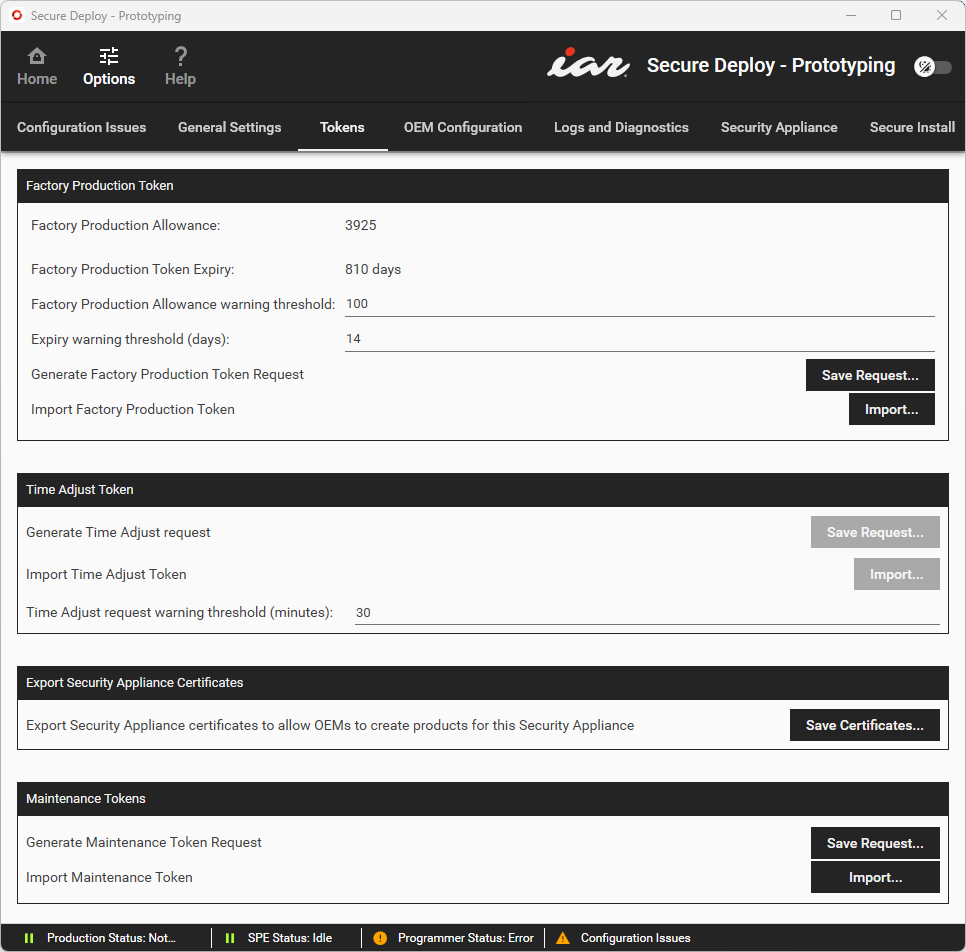
Use this category to export and import various kinds of files that you might have to send to or receive from Technical support or partners.
Factory Production Token
Click Import to navigate to a Factory Production token file (.cat). This token defines the total number of units the production system can produce.
Factory Production Allowance | The number of product units that can be produced, across all devices. |
Factory Production Token Expiry | The number of days until the product can no longer be produced. |
Factory Production Allowance warning threshold | Warns if the Factory Production Allowance goes below the threshold value. |
Expiry warning threshold | Warns when the Factory Production Allowance Expiry time limit goes below the threshold value. |
Generate Factory Production Token request | Click Save Request to save a Factory Production request file ( |
Import Factory Production token | Click Import to navigate to a Factory Production token file ( |
Time Adjust Token
Time Adjust tokens might be required to make sure that the date and time are synchronized correctly between the SPE process and the Security Appliance. A significant time mismatch can cause problems. For example, if the devices go live with a cloud service immediately after provisioning and the provisioning time is wrong, they might be rejected.
A red warning text will tell you if you need a token.
Generate time adjust request | Click Save Request to save a Time Adjust token request file ( |
Import time adjust token | Click Import to navigate to a Time Adjust token file ( |
Time adjust request warning threshold (minutes) | Warns when the time difference between the SPE process and the Security Appliance exceeds this threshold value. |
Export Security Appliance Certificates
Exports the certificates for the Security Appliance, so you can transfer them to the OEM for production.
Maintenance Tokens
Some events will force the Security Appliance into maintenance mode. In this mode, all secure keys will have been erased from the Security Appliance, and it cannot provision devices. An alert box will tell you if the appliance is in maintenance mode.
If the Security Appliance is in maintenance mode, contact IAR Systems Technical Support for instructions on recovering the unit. You might be asked to send in a Maintenance token request file or the Technical Support contact might provide a Maintenance token file for you to import.
Generate Maintenance Token request | If requested to by IAR Systems Technical Support, click Save Request to save a Maintenance token request file ( |
Import Maintenance Token | Click Import to navigate to a Maintenance token file ( |